


Fable: Track & Discuss Books
4.71.50K Reviews
App Specs
- Version
- 0.282.22891
- Updated On
- License
- Free
- Downloads
- 1,000,000+
- Developer
- Scribd, Inc.
- Categories
- Books & Reference
- Platform
- Android, iOS
Screenshots

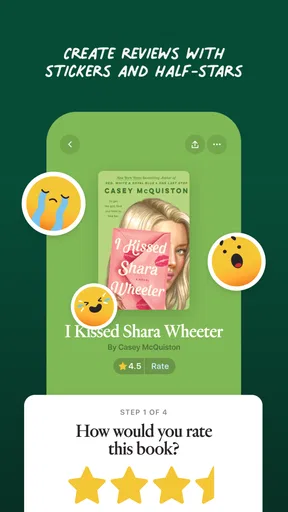
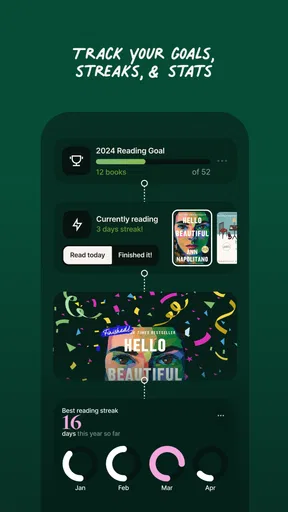
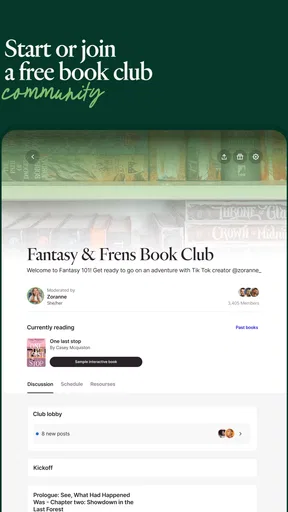
 Analysis by AppCompare
I tend to reach for a reading app when I want a quiet break, and for a TV app when I want something to watch. Fable is interesting because it puts those habits in the same place and encourages me to follow a story beyond one format. That makes it more than a digital bookshelf, though it also means it suits a particular kind of reader: someone who enjoys discussing books and comparing them with screen adaptations, not just collecting titles.
A quick start, with a different kind of browsing
In day-to-day use, the main appeal is the route from discovering a story to spending time with it. Instead of treating books and shows as unrelated lists, Fable gives them a shared context. I find that useful when I have finished a novel and want to see whether its adaptation offers a fresh take, or when a show makes me curious about the book behind it. The app is free to install, while in-app purchases range from $9.99 to $69.99 per item, so I would check what is included before treating the whole experience as cost-free.
Fable is a Books & Reference app from Scribd, Inc. Its audience is broad: the content rating is Everyone, and it has more than a million installs with a 4.4 average from around 20,000 ratings. Those figures suggest an established audience, but they do not tell me whether a particular book or show will be available where I live or whether the app’s social approach will click for me. I would install it for the combination of reading, viewing, and conversation rather than assume it replaces every book or streaming service I use.
Where it fits into a busy day
A realistic use is a commute or lunch break: I can make progress on a book in a short stretch, then return later to see what other readers are saying or look for a related adaptation. Progress tracking and goals can help turn that scattered time into a reading routine, especially if I set a modest target instead of making reading feel like another task to complete. Recommendations can also be more useful after I have shown the app what kinds of stories I enjoy, though I would treat them as starting points rather than a substitute for browsing on my own.
For a heavier session, such as moving between a book, a discussion, and a show, the advantage is having those interests gathered in one app. The trade-off is that switching between formats can make it tempting to leave a book unfinished just because its screen version is easy to sample. I would use the adaptation as a companion, not as a replacement, if what I want is the author’s pacing, interior detail, and language. Likewise, a show-first viewer may enjoy the discovery angle but should not expect a reading-focused experience to behave like a dedicated streaming catalog.
Reliability, expectations, and who should skip it
I would judge Fable’s speed by the tasks it asks me to do: browse, open reading material, keep track of progress, and join conversations. The straightforward library-to-TV layout gives those activities a clear path, but the app’s value depends more on finding a title that interests me than on moving quickly through menus. If a recommendation misses, I can keep browsing; if I want a specific book or episode immediately, a specialist service may be the more direct choice. I would also keep expectations sensible on a device that is already short on storage or running an older system, rather than assuming a mixed-media app will feel equally light on every phone.
One practical way to get more from it is to choose a book I already want to read, record my progress, and use discussions only after I have reached a point where other readers’ reactions will not spoil the story. Then, if an adaptation is available and appeals to me, I can compare a scene or character choice while the book is still fresh. That order makes the community and cross-format angle feel purposeful instead of turning the app into another stream of recommendations to scroll through. Readers who prefer a private, distraction-free ebook reader may be happier elsewhere; people who like talking about stories are more likely to value Fable’s extra layer.
Worth Reading Before You Choose

Flipboard Shows What News Apps Must Do Beyond the Feed

Switching to Android Auto Means Rethinking Your Driving Routine

Google Calendar Makes a Crowded Week Easier to Manage

Ludo King Makes the Most of the Minutes Between Plans

Baby Panda World Brings Quick Play to Modern Phones, but Its Game Library Feels Busy

ESPN’s Live Game View Makes Following Close Games Easier
Fable’s current version is 0.247.20905, and it requires Android 8.0 or later. The app is also available on iOS, giving people using either platform a way to explore its reading-and-viewing concept. As with any app that brings several activities together, I would keep it updated and give it a fair test with the kind of book or show I actually enjoy, rather than deciding from the first recommendation screen. I would not choose it solely for technical minimalism: its appeal is the experience around stories, not simply opening a file as quickly as possible.
Ever found yourself curled up on the couch with a good book, only to wish you could dive deeper into the world the author created? Well, let me introduce you to Fable: Books & TV. This app is like a magical gateway that blends the charm of reading with the allure of watching TV, creating a unique experience that’s pretty hard to resist.
Discovering a New World
So, what’s the deal with Fable: Books & TV? Imagine having a personal library that also doubles as your very own streaming service. The app offers a vast collection of books that you can read at your own pace. But here’s the twist: many of these books come with corresponding TV series or movie adaptations. It’s like having an interactive book club in your pocket!
The interface is super user-friendly. You’ve got your library, organized neatly, and it’s just a swipe away from the TV section. It’s all about convenience, and honestly, who doesn’t love that?
Features That Shine
One of the coolest features is the "Read and Watch" option. You can dive into a book and, once you’re hooked on the storyline, switch over to watch its adaptation. It’s a seamless transition that keeps you engaged with the story in a whole new way.
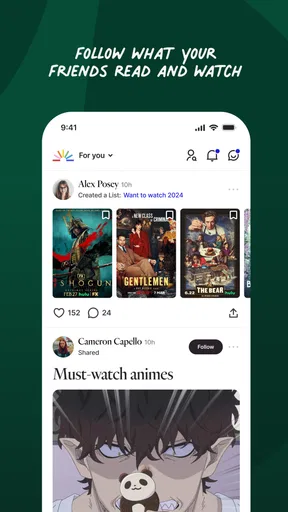
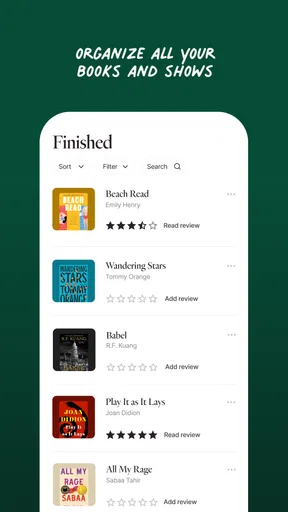
The app also offers personalized recommendations based on your reading and viewing habits. It’s like having a friend who just gets your taste in books and shows. Plus, there’s a nifty feature where you can track your progress and set goals. It’s perfect if you’re a bit competitive with yourself!
Why You'll Love It
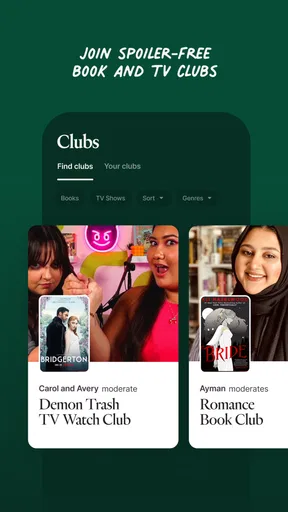
Now, let’s talk about the community aspect. Fable makes it easy to connect with other bookworms and TV buffs. You can join discussions, share thoughts, and even get insights from authors and creators. It feels like being part of a community that shares your passion for storytelling.
Another thing I love is how adaptive the app is. Whether you’re on an Android or iOS device, the experience is smooth and consistent. It’s all about accessibility, and Fable nails it.
The Final Chapter
In conclusion, if you’re someone who loves both reading and binging on TV shows, Fable: Books & TV is a must-have. It’s a fun, engaging way to explore stories from multiple angles, and it’s designed with the user in mind. So, go ahead, give it a try, and get ready to lose yourself in a world where books and TV blend seamlessly.
Ready to dive into your next adventure? Check out the download links, grab a comfy spot, and let the storytelling begin!
Pros
- Extensive library of books and shows.
- User-friendly interface for easy navigation.
- High-quality audio and video streaming.
- Personalized recommendations for users.
- Offline access to content available.
Cons
- Limited free content; subscription needed.
- Occasional buffering on slower networks.
- Content library varies by region.
- Requires a stable internet connection.
- Some titles are not available in all languages.
FAQs for Fable: Track & Discuss Books
What is Fable: Books & TV, and how does it work?
Fable: Books & TV is an innovative app that combines the joy of reading with the excitement of television content. It offers a curated selection of books and TV shows, allowing users to explore stories in various formats. The app provides personalized recommendations based on your preferences, making it easier to discover new favorites.
Is Fable: Books & TV available on both Android and iOS platforms?
Yes, Fable: Books & TV is available for download on both Android and iOS devices. You can find it on the Google Play Store for Android users and the Apple App Store for iOS users. Ensure your device meets the compatibility requirements for a seamless experience.
Does Fable: Books & TV require a subscription or payment?
Fable: Books & TV offers both free and premium content. While you can access a limited selection without any cost, subscribing to the premium version unlocks a wider range of books and TV shows. The subscription model is flexible, with options for monthly or annual plans to suit different budgets.
Can I download content for offline use on Fable: Books & TV?
Yes, Fable: Books & TV allows users to download content for offline viewing. This feature is particularly useful for those who want to enjoy books and shows without an internet connection. Simply choose the content you wish to download, and access it anytime, anywhere.
How does Fable: Books & TV handle user data and privacy?
Fable: Books & TV takes user privacy seriously. The app employs industry-standard encryption to protect your data and follows strict privacy policies. Users have control over their data, with options to manage permissions and settings. It's important to review their privacy policy to understand how your information is used.


